




















Table of Contents
- • DBConvert Review Summary
- • About DBConvert
- • Other opinions about DBConvert
- • Overview of DBConvert
- • DBConvert Review
- • DBConvert Studio Review
- • DBConvert Pros & Cons
- • DBConvert Return Policy
- • DBConvert Digital Delivery Policy
- • How to Contact DBConvert
- • Where to buy DBConvert?
- • Conclusion of DBConvert reviews & ratings
DBConvert Review Summary
DBConvert is a software suite designed for database migration and synchronization supporting over 30 database engines. It plays a role in simplifying complex data transfers and ongoing sync tasks across heterogeneous systems. The software generally delivers reliable performance with automated SQL translation and parallel processing, although some limitations exist regarding procedural object migration and cost.
Highlights
- Suitable for database administrators and enterprise IT teams
- Supports migration, synchronization, and replication of 30+ databases
- Trade-off between high cost and limited support for stored procedures
- Balanced multi-database tool with a score of 8.2/10
Within the broader database migration category, DBConvert offers a comprehensive option focused on automation and speed. Alternative tools may better suit smaller budgets or specialized procedural migrations. For detailed insights, see DBConvert review.
About DBConvert
Database migration and synchronization can be complex when working with multiple database engines. Manual transfers are slow and prone to errors, risking data integrity and causing added workload. Different SQL dialects and metadata handling make it difficult to maintain consistent data across platforms.

DBConvert provides a comprehensive software toolkit that supports over 30 database types. It offers a unified desktop application to perform both migration and continuous synchronization, automating SQL view translation and enabling high-speed parallel transfers. This positions DBConvert as a premium solution for enterprise IT teams managing diverse databases.
With 25 years in operation and a user base including database administrators and developers worldwide, DBConvert is recognized for its reliable performance. It has received positive feedback for cross-database compatibility, automated SQL translation, and flexible synchronization methods. The latest version and updates reflect ongoing product development and support.
DBConvert is best suited for medium to large IT teams needing robust multi-database migration and sync tools. Its strengths in automation and speed come with a trade-off: a relatively high license cost and limited support for migrating stored procedures or triggers. For a detailed evaluation, see our DBConvert review.
Overview of DBConvert
DBConvert is a software company specializing in database migration and synchronization tools. Founded in 2001 and owned by Slotix s.r.o., it operates within the software industry, focusing on solutions for converting and syncing data across over 30 relational and cloud database types. The company's role primarily addresses database administrators and IT professionals who manage complex data transfers.
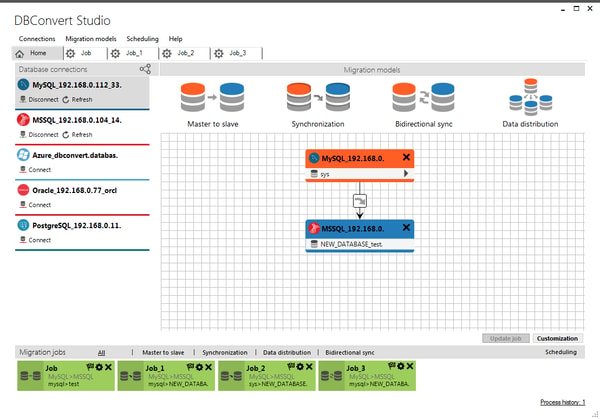
DBConvert provides a suite of products including DBConvert Studio, DBSync, and DBConvert Streams, delivering services such as one-time migration, ongoing synchronization, and change data capture (CDC). Its software supports Windows natively and macOS and Linux via WINE, offering parallel multi-threaded migration and automated SQL view translation. Distribution is handled directly through downloadable desktop applications sold on its official website, with global reach supporting local, network, and cloud database instances.
With 25 years in operation, DBConvert has released its latest Studio version 4.3.1 in May 2026 and DBConvert Streams 2.0 supporting CDC and federated SQL. The platform is notable for handling diverse database pairs within a single application and supporting both trigger-based and CDC synchronization modes. External reviews highlight its capability to process large datasets rapidly and maintain continuous synchronization, while licensing costs and limited stored procedure migration remain documented considerations. This information contributes to the factual profile in the DBConvert Review.
DBConvert Review
DBConvert is a software brand specializing in database migration and synchronization solutions. It focuses on providing tools that support seamless data transfer and ongoing synchronization across a wide range of database engines. The brand aims to simplify complex database management tasks for IT professionals and enterprises.
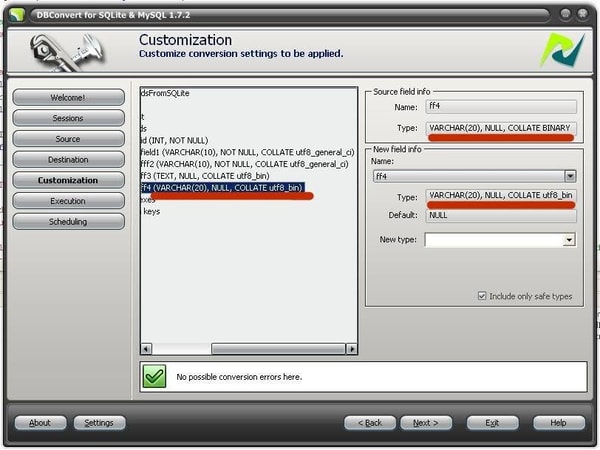
The DBConvert product suite includes tools designed to handle data migration and synchronization across over 30 different database types. These tools offer automation features such as SQL view translation and use parallel processing to enhance speed and efficiency. DBConvert positions itself as a reliable solution for medium to large organizations seeking to manage diverse database environments with minimal manual intervention.
DBConvert Highlights- Supports 30+ database engines
- Automated SQL view translation
- Parallel multi-threaded migration
- Flexible synchronization modes
- Combines migration and sync workflows
DBConvert Studio Review
DBConvert Studio is a software tool designed for database administrators, software developers, and enterprise IT teams to facilitate data migration and synchronization across multiple database platforms. It serves as a solution for both one-time data transfers and ongoing synchronization, combining these workflows in a single application.
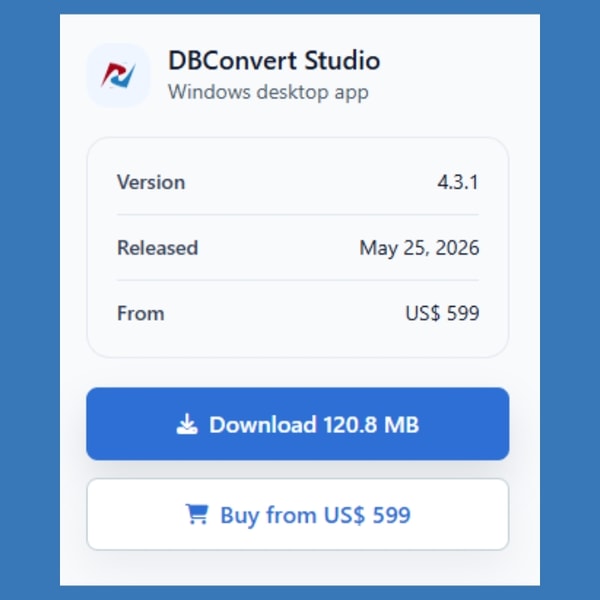
The software features a multithreaded migration engine and automates SQL view translation, supporting Windows natively and macOS/Linux through WINE compatibility layers. It enables high-speed data transfer and synchronization for over 30 database engines, including major platforms like MySQL and Oracle.
Priced at approximately 599 USD per year, DBConvert Studio is available as a downloadable desktop application from the official website. The product requires Microsoft Visual C++ 2015 x86 Redistributable and Microsoft .NET 4.0 Framework for installation and operation.
Price $599 • dbconvert.com
DBConvert Pros & Cons
DBConvert excels in providing broad compatibility with over 30 database engines and integrates both migration and synchronization workflows into a single desktop application. Its automation features, including SQL view translation and multithreaded parallel migration, help improve efficiency and reduce errors when handling complex database transfers.
However, the software comes with a relatively high annual license cost, which may not be suitable for smaller teams or individual users. Additionally, it has limited support for migrating stored procedures and triggers, and some users may find the interface less modern and somewhat unintuitive compared to newer software.
- • Supports over 30 database engines
- • Automated SQL view translation
- • Fast parallel multi-threaded migration
- • Flexible synchronization modes with triggers and CDC
- • Single app for migration and synchronization
- • Supports local, network, and cloud databases
- • Combines migration and synchronization workflows
- • High license cost around $599 per year
- • Limited support for stored procedures and triggers
- • User interface may feel dated or less intuitive
DBConvert Return Policy
The return policy information for this product is currently not documented, including any specific timeframes or conditions under which returns may be accepted. There are no details available about potential fees or charges associated with the return process. Customers should be aware that the absence of this information may require direct inquiry with the support team for clarification.
Additional aspects such as exclusions or special cases for returns have also not been specified. Without documented guidance, it is unclear what limitations or restrictions might apply to returning the product. Potential buyers are advised to consider this lack of explicit return policy details when making purchasing decisions.
DBConvert Digital Delivery Policy
DBConvert products are delivered exclusively through digital download from the official website. This method provides global availability without physical shipping requirements. Users download the software directly to their computer after purchase.
Access to the software is immediate upon completing the purchase, with no shipping delays or additional costs. There is no physical shipment or tracking involved. The software license is activated online following download, ensuring prompt usage.
How to Contact DBConvert
Users can reach DBConvert for support through their official support page, email, and social media channels. No direct phone or live chat contact details are publicly available.
- Support page: https://dbconvert.com/support/
- Email: [email protected]
- Facebook: DBConvert
- Twitter: @dbconvert
For inquiries related to orders, technical support, and licensing, users are encouraged to contact DBConvert through these available methods.
Where to buy DBConvert?
DBConvert products are officially available through the company's website, where users can securely manage their accounts, access support, and review clear purchase policies. Purchasing via the official channel ensures a consistent experience with direct downloads and legitimate licensing, which mitigates risks often associated with third-party marketplaces. Users should anticipate immediate availability and structured support but remain aware that availability and service standards can differ when exploring alternative purchasing options outside the official domain. For more information, visit dbconvert.com to ensure reliability and clarity in acquiring the software.
Conclusion of DBConvert reviews & ratings
DBConvert plays an important role in database migration and synchronization by providing reliable tools that support over 30 database types. Its strengths include automated SQL view translation, parallel multi-threaded migration, and versatile synchronization options, all detailed at dbconvert.com. These features help simplify complex database management tasks for IT professionals and developers.
Those interested in learning more can explore its capabilities further while maintaining a clear understanding of its scope and limitations. Revisiting the DBConvert review offers a balanced perspective to help evaluate if it fits specific needs without pressure or assumptions.
Editorial notes reflect aggregated buyer feedback and our independent editorial review of publicly available information. They are for informational purposes only and do not constitute endorsements. Purchases are made at your own discretion, and we are not responsible for transactions or outcomes related to this store. Experiences may vary. This content is assisted by AI and reviewed by our editorial team. While we strive for accuracy, AI-supported information may not always be 100% precise, so please verify any critical details.

